

In the world of SEO, backlinks are like votes of confidence. But what happens when those votes come from shady or irrelevant sources? Welcome to the dark side of SEO: spam backlinks.
If left unchecked, spammy backlinks can drag your rankings into the gutter, killing your organic traffic, spoiling your digital marketing strategies, damaging your online reputation, and even triggering penalties from Google. Yikes!
But don’t worry. In this guide, we’re diving deep into what spam backlinks are, how to identify them, how to remove them, and how to protect your website from future damage. Whether you’re a business owner, SEO pro, or digital marketer, this guide will help you clean up your link profile and stay in Google’s good graces.
What Are Spam Backlinks?
Spam backlinks are harmful, low-quality links from irrelevant or untrustworthy websites, often created to manipulate search rankings. Instead of helping, they can damage your site’s authority, lower your positions in search results, and even trigger penalties from Google. The best defense is to run regular backlink audits with SEO tools, disavow toxic links when necessary, and concentrate on earning natural, high-quality backlinks that strengthen your site’s credibility.
Common Traits of Spam Backlinks:
- Originate from irrelevant, unrelated, or foreign-language sites.
- Use exact-match or keyword-stuffed anchor text unnaturally.
- Come from link networks or schemes (e.g., Private Blog Networks — PBNs).
- Appear in comment sections, forum signatures, low-quality directories, or hacked pages.
- Show sudden volume spikes (high link velocity) or identical anchors across many domains.
- Hosted on pages with thin content, excessive ads, or malware warnings.
These links are typically used in black-hat SEO or negative SEO attacks aimed at manipulating rankings, or worse, sabotaging a competitor’s website.
How Spammy Links Harm Your Website
Spammy backlinks aren’t just annoying—they’re dangerous. They can cripple your SEO, damage your domain’s trustworthiness, and put your site at risk of penalties from Google. Even if you didn’t build these links yourself, your site can suffer from their presence.
Here’s how:
1. Drop in Search Engine Rankings
Google’s algorithms prioritize link quality over quantity. If your backlink profile is filled with spammy or irrelevant links, it can signal manipulation or unnatural growth, leading to an algorithmic downgrade or even a manual penalty.
💡 Example: A spike in low-quality links from foreign domains can tank your position for competitive keywords almost overnight.
2. Manual Penalties from Google
If Google believes you’re participating in manipulative link schemes, they can issue a manual action against your site. This is serious—it can deindex your pages or kill your organic traffic until the issue is fixed and a reconsideration request is approved.
3. Wasted Crawl Budget
When bots crawl spammy sites linking to you or follow poor-quality links, your crawl budget may be wasted. That means Googlebot might not get to your most important pages, slowing down indexing and affecting visibility.
4. Loss of Domain Authority
Spammy backlinks can dilute your domain’s authority. Search engines measure your reputation partly based on who links to you. Too many shady links = less trust = weaker rankings.
5. Tarnished Brand Reputation
Toxic links not only damage rankings but also hurt brand perception, which makes SEO reputation management a necessary layer of defense. Links from unethical or adult sites can hurt your brand image. If a customer sees your domain associated with sketchy sources, it creates a trust gap, even if you had nothing to do with it.
6. Vulnerability to Negative SEO Attacks
Spammy links are often used in negative SEO attacks by competitors. They flood your site with toxic backlinks to damage your rankings intentionally. If you’re not monitoring your link profile regularly, these attacks can go unnoticed until it’s too late.
Toxic links can severely impact your local rankings—our Local SEO 2026 Guide shows how to protect your business locally.
How Do I Check Spam Backlinks

Before cleaning up your backlink profile, you need to know exactly what you’re dealing with. Not all backlinks are created equal, and some could be dragging your SEO down without you even knowing.
Here’s a step-by-step breakdown on how to check spammy backlinks or toxic backlinks:
🧩 1. Use SEO Tools to Audit Your Backlink Profile
Start by gathering a complete list of all the websites linking to yours. These tools can help:
- Google Search Console – Free and direct from Google
- Ahrefs – Powerful backlink audit and toxicity detection
- SEMrush – Includes toxic link scoring and disavow file export
- Moz Link Explorer – Shows spam score and link quality indicators
- Majestic – Offers trust flow and citation flow metrics
Export your backlink profile and analyze it carefully.
🚩 2. Look for These Red Flags
Here are the most common signs of a spammy backlink:
- Irrelevant Domains
Links from websites completely unrelated to your niche or industry (e.g., a gambling site linking to a dental clinic). - Foreign or Low-Quality TLDs
Domains with extensions like .xyz, .ru, .cn, .info, etc., are especially irrelevant to your market. - Over-Optimized Anchor Text
If the anchor text is full of exact-match keywords or salesy terms (e.g., “buy cheap SEO services”), it’s likely unnatural. - Deindexed or Penalized Sites
If a linking site no longer appears in Google search results, it’s likely been deindexed or penalized—bad news for your link profile. - Comment Spam or Forum Signatures
Links in user-generated content from low-quality forums, blog comments, or free directories. - Sudden Backlink Spikes
A massive, unnatural increase in backlinks in a short time can signal a negative SEO attack or spam campaign.
📊 3. Check for Spam Scores and Trust Metrics
Many tools assign a “spam score” or trust rating to each backlink source. Here’s how to interpret them:
- Moz’s Spam Score: 0–17 scale; above 7 is potentially risky
- Ahrefs Domain Rating (DR): Lower DR with a high number of outbound links = spam risk
- SEMrush Toxic Score: High scores mean higher risk backlinks
- Majestic Trust Flow vs. Citation Flow: A big imbalance signals low trust
🔍 4. Manually Review Suspicious Links
If tools flag links as toxic, don’t rely solely on automation. Manually visit the domain and ask:
- Is the content relevant to your niche?
- Is the website full of ads or broken pages?
- Does it look like a link farm or hacked blog?
- Are there hundreds of outgoing links on the same page?
If the answer is yes to any of these, you’ve got a spam link.
🧠 5. Set Up Alerts for New Backlinks
Use tools like Ahrefs or SEMrush to get real-time alerts when your site gets new links. That way, you can immediately investigate anything suspicious before it causes damage.
Pro Tip: Keep a spreadsheet of all identified spammy domains with notes and dates. This helps track repeat offenders and makes it easier when building your disavow file later.
Main Causes of Toxic Backlinks
Toxic backlinks don’t appear out of nowhere—most stem from outdated strategies, shady tactics, or external threats. Here’s a breakdown of common actions (intentional or not) that lead to harmful backlinks:
1. Buying Backlinks from Other Sites
Paying for backlinks might sound like a quick SEO win, but it violates Google’s guidelines, especially if those links aren’t labeled as sponsored or nofollow. These paid links are often placed on low-quality or irrelevant websites, which can tank your site’s credibility.
2. Trading Links with Other Websites
Link exchanges like “you link to me, I’ll link to you” may seem harmless, but when done excessively or with irrelevant sites, they’re seen as manipulative. Search engines can detect unnatural link schemes and flag them.
3. Participating in Private Blog Networks (PBNs)
PBNs are networks of websites created solely to build backlinks. While they might pass authority short-term, Google is excellent at spotting them, and when it does, your rankings could take a serious hit.
4. Relying on Automated Link Building Tools
Using bots or automation tools to generate hundreds or thousands of backlinks might sound efficient, but it often results in a flood of links from spammy or unrelated sources, hurting your backlink profile more than helping.
5. Inserting Irrelevant or Spammy Links on External Sites
Posting your links in blog comments, forums, or other websites without adding real value is a classic spam tactic. These low-quality links often get ignored by readers and penalized by search engines.
6. Listing Your Website on Poor-Quality Directories
Submitting your site to every online directory you can find used to be an SEO tactic, but now, if those directories lack authority or relevance, those backlinks can be considered toxic.
7. Embedding Links in Free Tools or Widgets
Adding links inside widgets or tools (like calculators or badges) and distributing them to other websites might generate backlinks, but search engines see this as manipulative if not properly labeled or disclosed.
8. Forcing Clients or Partners to Add a Backlink in Contracts
If your service agreements or contracts require clients or partners to link back to you, Google might view those links as unnatural, especially if they don’t come from relevant content or are placed sitewide.
9. Being Targeted by Negative SEO Campaigns
In some cases, spammy backlinks appear due to malicious actions from competitors. These negative SEO attacks involve flooding your site with toxic backlinks to sabotage your rankings, and they’re more common in competitive niches.
What’s the Difference Between High-Quality and Low-Quality Backlinks?
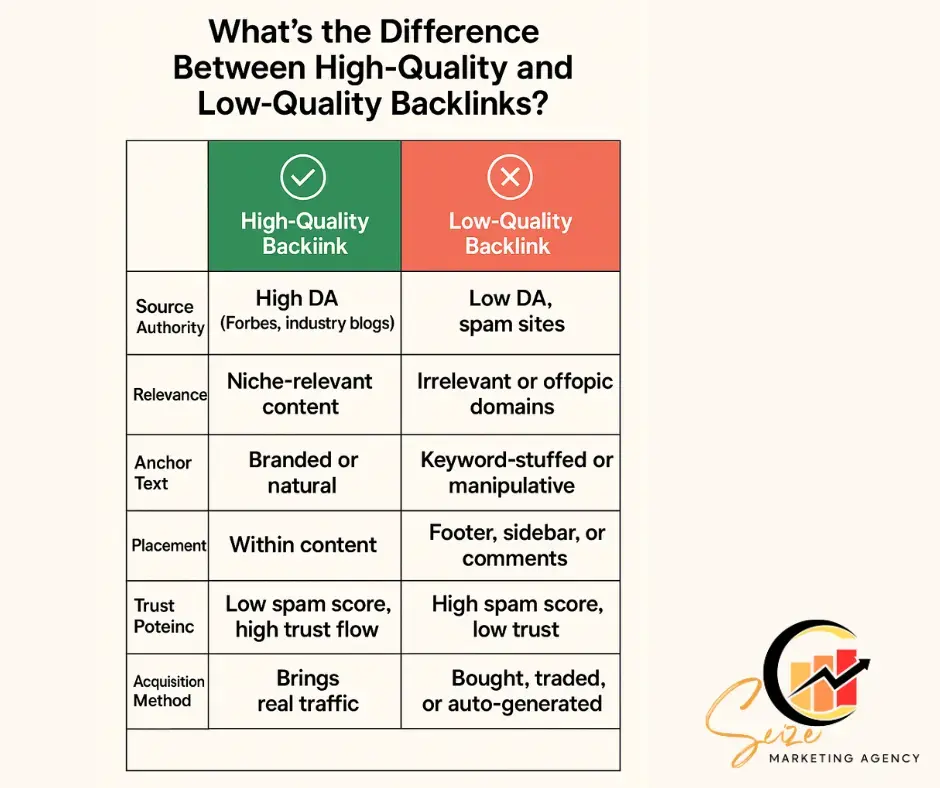
Not all backlinks are created equal, and when it comes to SEO, quality matters far more than quantity. One high-authority backlink can boost your rankings, while a dozen low-quality ones can hurt them.
Many marketers believe more links are always better, but one of the hard truths about SEO is that quality matters far more than quantity. Let’s break down the key differences between high and low-quality backlinks:
🟢 High-Quality Backlinks: Your SEO Superstars
These are the types of backlinks that Google loves—they boost your domain authority, improve your keyword rankings, and drive relevant traffic to your site.
✅ Traits of High-Quality Backlinks:
- From Authoritative Sites
Think Forbes, HubSpot, BBC, or trusted industry blogs. These sites have strong domain ratings and a clean backlink profile themselves. - Relevant to Your Niche
A backlink from a respected site in your industry (e.g., a tech blog linking to your software tool) tells Google you’re a trusted resource in your field. - Earned Naturally
Comes from people genuinely referencing your content—not bought or forced. - Placed Contextually
The link appears within meaningful content, not dumped in a footer or sidebar. - Uses Branded or Natural Anchor Text
Anchor text like “according to [Your Brand]” is safer and more organic than “best SEO services buy now.” - Drives Real Traffic
People actually click the link, engage with your site, and may even convert—huge SEO win.
🔴 Low-Quality Backlinks: The SEO Red Flags
These links don’t just fail to help you—they can actively hurt your rankings and reputation.
❌ Traits of Low-Quality Backlinks:
- From Spammy or Irrelevant Sites
Backlinks from unrelated or low-trust websites (e.g., adult, gambling, or foreign spam sites) send bad signals to Google. - Generated by Automation or Black Hat Tools
Tools that mass-produce links through blog comments, forums, or link farms are a big no-no. - Over-Optimized Anchor Text
If a backlink to your site includes exact-match keywords excessively (e.g., “cheap SEO agency in New York” 10 times), it screams manipulation. - From Link Farms or PBNs (Private Blog Networks)
These are networks of websites created solely to link to each other and manipulate rankings. - No Real Content Around the Link
A backlink on a thin-content page with little to no context is considered worthless—or worse, toxic. - High Spam Score or Low Trust Flow
SEO tools will often flag these domains as having poor reputations or unnatural linking behavior.
⚖️ Quick Comparison Table
| Feature | High-Quality Backlink | Low-Quality Backlink |
| Source Authority | High DA (Forbes, industry blogs) | Low DA, spam sites |
| Relevance | Niche-relevant content | Irrelevant or off-topic domains |
| Anchor Text | Branded or natural | Keyword-stuffed or manipulative |
| Placement | Within content | Footer, sidebar, or comments |
| Trust Metrics | Low spam score, high trust flow | High spam score, low trust |
| Traffic Potential | Brings real traffic | No clicks, no engagement |
| Acquisition Method | Earned through quality content | Bought, traded, or auto-generated |
💡 Pro Tip:
Focus on earning high-quality backlinks through content marketing, digital PR, guest posting on relevant sites, and building relationships in your industry. One good backlink is worth more than 100 bad ones.
How to Remove Spam Backlinks
Once you’ve identified spam backlinks, the next step is cleaning them up before they sabotage your SEO efforts. Google might penalize your site if it thinks you’re trying to manipulate search rankings—even if you’re the victim of a negative SEO attack.
Here’s exactly how to remove spammy backlinks the right way:
🛠️ 1. Reach Out and Request Removal
This is your first and most polite option.
👉 How to do it:
- Find the contact email or contact form on the spammy site.
- Send a friendly, professional email asking the webmaster to remove the backlink.
- Include:
-
- The exact URL of the page linking to your site
- Your page URL they are linking to
- A brief explanation (e.g., “This backlink appears unrelated and may negatively affect our SEO.”)

